
Early Adoption / Experimental Technology
The architecture, tooling, and techniques described in this paper represent early-stage adoption of AI-assisted software development. They are provided for educational and informational purposes only. This approach has not been validated for production use and should not be deployed in production Oracle APEX environments without thorough independent review, testing, and organizational approval.
AI-Generated Code Must Be Reviewed
All SQL, PL/SQL, and shell commands generated by AI agents must be reviewed by a qualified developer or DBA before execution against any database, especially in environments containing sensitive, regulated, or business-critical data. AI models can and do produce plausible-looking but incorrect, incomplete, or destructive code. The author accepts no liability for data loss, system instability, security vulnerabilities, or any other damage.
Not Affiliated with Oracle Corporation
This paper is an independent technical reference and is not affiliated with, endorsed by, or sponsored by Oracle Corporation. Oracle, Oracle APEX, Oracle Database, SQLcl, and related names are trademarks of Oracle Corporation. The internal Oracle PL/SQL packages described are undocumented internal APIs whose behavior may change without notice in any APEX release.
Not Affiliated with Nous Research, Anthropic, or Any LLM Provider
References to Hermes Agent (Nous Research), Claude (Anthropic), DeepSeek, and OpenRouter are for informational purposes only. LLM providers, pricing, model capabilities, and API availability may change at any time.
Security and Credential Responsibility
This paper contains references to database credentials, API keys, SSH configurations, and network access patterns. All credentials shown are placeholders only. Never expose database passwords, API keys, or bot tokens in shared code, version control, or public documentation. By applying any part of this paper, you acknowledge you do so entirely at your own risk.
Abstract
Oracle Application Express (APEX) stores every application component — pages, regions, items, validations, processes, and branches — as metadata rows in database tables. This means that any tool capable of executing PL/SQL can programmatically construct, modify, and verify complete APEX applications without ever opening the App Builder GUI.
This paper documents a complete, production-tested architecture for AI-agent-driven APEX development: an Ubuntu VPS running Oracle Instant Client 23 and SQLcl 26.1, connected to an Oracle 26ai Free database via SSH tunnel, orchestrated by the Hermes Agent framework using a purpose-built APEX skill file. It covers every infrastructure component, configuration step, critical discovery (including hard-won lessons about the APEX 24.2 API), a reusable bootstrap script that auto-generates workspace-specific skill files, and Telegram integration for mobile access.
The result is a development workflow where a developer describes what they want in natural language from a phone via Telegram, and the agent generates, stages, executes, and verifies the SQL that builds it.
1. Architecture Overview
1.1 Core Concept: APEX Is Just Metadata
When you export an APEX application, the output is a SQL script containing calls to Oracle-internal PL/SQL packages that reconstruct the application by inserting rows into metadata tables. The APEX runtime reads those rows to render pages. There is no compiled code, no binary — only data.
This architecture has a powerful implication: any process that can execute PL/SQL against the database can build an APEX application. The App Builder GUI is a convenience wrapper, not a requirement.
1.2 System Components
| Component | Stack |
|---|---|
| Oracle Database | Oracle 26ai Free (VirtualBox, Windows host) |
| APEX Version | 24.2.0 (schema: APEX_240200) |
| VPS OS | Ubuntu 24.04 LTS (Hetzner) |
| Oracle Client | Instant Client 23.26 (zip install) |
| SQL CLI | SQLcl 26.1.0 (Java-based, APEX export support) |
| Agent Framework | Hermes Agent v0.13 (Nous Research) / Claude Code |
| LLM Provider | OpenRouter → DeepSeek R1 / Claude Sonnet |
| Network | SSH reverse tunnel (Windows → VPS → Oracle VM) |
| Mobile Access | Telegram Bot via Hermes Gateway |
1.3 Agent Loop
The agent follows a deterministic workflow for every generation task:
| Step | Action |
|---|---|
| QUERY | Inspect existing application structure via APEX_APPLICATION_* views |
| PLAN | Identify all database and APEX objects needed |
| GENERATE | Write complete SQL using wwv_flow_imp_page.* patterns |
| STAGE | Write script to ~/apex_agent/work/ before execution |
| SHOW | Display the staged script for optional review |
| EXECUTE | Run via SQLcl against the target database |
| VERIFY | Query APEX metadata views to confirm objects were created |
| ROLLBACK | On errors, remove_page and retry from step 3 |
2. Infrastructure Setup
2.1 VPS Provisioning
The architecture uses an Ubuntu 24.04 VPS.
2.2 System Prerequisites
Ubuntu 24.04 ships with libaio renamed to libaio1t64. Oracle Instant Client expects libaio.so.1 — the symlink fix below is required:
sudo apt-get update
sudo apt-get install -y libaio1t64 alien unzip openjdk-17-jdk

# Ubuntu 24.04 specific: create missing symlink
sudo ln -sf /usr/lib/x86_64-linux-gnu/libaio.so.1t64 \
  /usr/lib/x86_64-linux-gnu/libaio.so.1
sudo ldconfig
2.3 Oracle Instant Client Installation
Oracle ships Instant Client as zip packages for Ubuntu (not RPMs). All three zips extract into the same directory. Use the -o flag to suppress overwrite prompts on shared manifest files:
# SCP from local Windows machine to VPS (run in PowerShell)
scp instantclient-basic-linux.x64-23.26.*.zip    youruser@<IP>:~/uploads/
scp instantclient-sqlplus-linux.x64-23.26.*.zip  youruser@<IP>:~/uploads/
scp instantclient-tools-linux.x64-23.26.*.zip    youruser@<IP>:~/uploads/

# On VPS as root — copy from landing zone and install
cp /home/youruser/uploads/*.zip /tmp/
mkdir -p /opt/oracle
unzip -o /tmp/instantclient-basic-*.zip   -d /opt/oracle
unzip -o /tmp/instantclient-sqlplus-*.zip -d /opt/oracle
unzip -o /tmp/instantclient-tools-*.zip   -d /opt/oracle

# Verify folder name
ls /opt/oracle/
# Result: instantclient_23_26

# Create required library symlinks
cd /opt/oracle/instantclient_23_26/
ln -sf libclntsh.so.23.1     libclntsh.so
ln -sf libclntshcore.so.23.1 libclntshcore.so
ln -sf libocci.so.23.1       libocci.so

# Register with ldconfig
echo /opt/oracle/instantclient_23_26 > /etc/ld.so.conf.d/oracle-instantclient.conf
ldconfig

# Confirm libraries are registered
ldconfig -p | grep libclntsh
2.4 SQLcl Installation
# SCP sqlcl zip to VPS
scp sqlcl-*.zip youruser@<IP>:~/uploads/

# Install as root
cp /home/youruser/uploads/sqlcl-*.zip /tmp/
mkdir -p /opt/sqlcl
unzip /tmp/sqlcl-*.zip -d /opt/sqlcl
chmod -R 755 /opt/sqlcl
2.5 System Environment Profile
Create /etc/profile.d/oracle.sh using tee (works reliably over SSH, unlike heredocs in the Hetzner console):
sudo tee /etc/profile.d/oracle.sh << 'EOF'
export ORACLE_HOME=/opt/oracle/instantclient_23_26
export LD_LIBRARY_PATH=$ORACLE_HOME:$LD_LIBRARY_PATH
export PATH=$ORACLE_HOME:/opt/sqlcl/sqlcl/bin:$PATH
export TNS_ADMIN=/etc/oracle/network/admin
export NLS_DATE_FORMAT="YYYY-MM-DD"
export NLS_LANG=AMERICAN_AMERICA.AL32UTF8
EOF

sudo chmod +x /etc/profile.d/oracle.sh
source /etc/profile.d/oracle.sh
2.6 TNS Configuration
Instant Client zip installs may ignore TNS_ADMIN and look in $ORACLE_HOME/network/admin instead. Copy tnsnames.ora to both locations to ensure it is always found:
sudo mkdir -p /etc/oracle/network/admin
sudo mkdir -p /opt/oracle/instantclient_23_26/network/admin

sudo tee /etc/oracle/network/admin/tnsnames.ora \
  /opt/oracle/instantclient_23_26/network/admin/tnsnames.ora << 'EOF'
LOCAL_ORACLE =
  (DESCRIPTION =
    (ADDRESS = (PROTOCOL = TCP)(HOST = localhost)(PORT = 1521))
    (CONNECT_DATA =
      (SERVER = DEDICATED)
      (SERVICE_NAME = FREEPDB1)
    )
  )
EOF

sudo tee /etc/oracle/network/admin/sqlnet.ora \
  /opt/oracle/instantclient_23_26/network/admin/sqlnet.ora << 'EOF'
NAMES.DIRECTORY_PATH = (TNSNAMES, EZCONNECT)
EOF
2.7 Verify Client Installation
sqlplus -V
# SQL*Plus: Release 23.26.2.0.0 - Production

sql -V
# SQLcl: Release 26.1.0.0 Production
3. Database Connectivity
3.1 Oracle 26ai Free on VirtualBox
Oracle 26ai Free runs as a VirtualBox VM on the developer's Windows workstation. The VM exposes Oracle listener on the local network. The PDB (pluggable database) FREEPDB1 is where APEX workspaces and application schemas live.
-- Register FREEPDB1 with the listener
ALTER SESSION SET CONTAINER = FREEPDB1;
ALTER SYSTEM REGISTER;
3.2 SSH Reverse Tunnel
The VPS cannot reach the VirtualBox VM's private IP address directly. An SSH reverse tunnel forwards the Oracle port from the VPS through the developer's Windows machine to the VM:
# Run in PowerShell on Windows — keep this window open while working
# Replace <VM_IP> with your VirtualBox VM's local IP
ssh -R 1521:<VM_IP>:1521 deploy@<VPS_IP> -N

# First verify the Oracle listener is reachable from Windows
Test-NetConnection -ComputerName <VM_IP> -Port 1521
# TcpTestSucceeded should return True
3.3 Connection Validation
Test connectivity in this order before any agent work:
# 1. SQL*Plus (tests native client libraries)
sqlplus -S HR/<PASSWORD>@//localhost:1521/FREEPDB1 << 'EOF'
SELECT 'SQL*Plus OK' FROM dual;
EXIT;
EOF

# 2. SQLcl with -thin flag (required — OCI8 causes auth issues)
sql -thin HR/<PASSWORD>@//localhost:1521/FREEPDB1 << 'EOF'
SELECT 'SQLcl OK' FROM dual;
EXIT;
EOF

# 3. APEX export (confirms full stack)
sql -thin HR/<PASSWORD>@//localhost:1521/FREEPDB1 << 'EOF'
apex export -applicationid 100
EXIT;
EOF
# Result: f100.sql created in current directory4. Hermes Agent Configuration
4.1 Installation
# Install Hermes Agent
curl -fsSL https://raw.githubusercontent.com/NousResearch/hermes-agent/main/scripts/install.sh | bash
source ~/.bashrc

# Verify all components
hermes doctor
4.2 Provider Configuration
DeepSeek R1 via OpenRouter is strongly recommended for APEX generation tasks. Claude in an agentic loop with multiple tool-call round trips can cost $3–5 per page generation. DeepSeek R1 reduces this by approximately 90% for equivalent APEX code generation output.
# Set provider and model
hermes config set model deepseek/deepseek-r1

# Set OpenRouter API key
hermes config set OPENROUTER_API_KEY <YOUR_OPENROUTER_API_KEY>

# Verify configuration
hermes config show4.3 Skills System
Hermes uses a skills directory at ~/.hermes/skills/. Each skill file is a Markdown document providing domain-specific context, patterns, and rules. The APEX skill file teaches the agent the correct API calls, required parameters, and failure modes for the target APEX version.
# Install the base APEX skill
cp oracle-apex.md ~/.hermes/skills/oracle-apex.md

# Install workspace-specific skill (generated by bootstrap script)
cp apex_HR_DEV_100.md ~/.hermes/skills/
4.4 Project Context File
Create CONTEXT.md in the project working directory. Hermes loads this automatically when launched from that directory:
# ~/apex_agent/CONTEXT.md

## Database Connection
- Command: sql -thin HR/<PASSWORD>@//localhost:1521/FREEPDB1
- App ID: 100, Workspace: HR_DEV, Schema: HR
- APEX version: 24.2 (schema: APEX_240200)

## Rules
- Always stage scripts to ~/apex_agent/work/ before executing
- Always verify with APEX_APPLICATION_* views after execution
- Use wwv_flow_imp_page for all APEX object creation
4.5 Launching the Agent
# Always launch from project directory so CONTEXT.md is loaded
cd ~/apex_agent
hermes

# Note: --tui flag may fail with NODE_OPTIONS conflict
# Use plain "hermes" command instead
5. The APEX Skill File
5.1 Why wwv_flow_api Fails in APEX 24.2
APEX export scripts use wwv_flow_imp_page.*, the internal import API used by APEX itself during export/import operations. This is the correct and reliable package for programmatic object creation.
| APEX 24.2 Import APIs |
|---|
| wwv_flow_imp_page.create_page |
| wwv_flow_imp_page.create_page_plug |
| wwv_flow_imp_page.create_page_item |
| wwv_flow_imp_page.create_button |
| wwv_flow_imp_page.create_page_validation |
| wwv_flow_imp_page.create_page_process |
| wwv_flow_imp_page.create_page_branch |
5.2 Required Script Wrapper
Every script must be wrapped with wwv_flow_imp.import_begin and import_end. Without this wrapper the import package has no application context and calls fail silently or error:
set define off verify off feedback off
whenever sqlerror exit sql.sqlcode rollback

begin
  wwv_flow_imp.import_begin(
    p_version_yyyy_mm_dd     => '2024.11.30',
    p_release                => '24.2.0',
    p_default_workspace_id   => <WORKSPACE_ID>,
    p_default_application_id => <APP_ID>,
    p_default_id_offset      => 0,
    p_default_owner          => '<SCHEMA>'
  );
end;
/

-- wwv_flow_imp_page calls here

begin
  wwv_flow_imp.import_end(
    p_auto_install_sup_obj => nvl(
      wwv_flow_application_install.get_auto_install_sup_obj, false)
  );
  commit;
end;
/
5.3 The Breadcrumb Requirement
Pages created without a breadcrumb region redirect users to the "Unused Lists" report in Shared Components. APEX expects a NATIVE_BREADCRUMB region at REGION_POSITION_01 on every normal page. This was discovered through production failure — the agent created pages that appeared correct in the metadata but redirected on navigation.
5.4 Interactive Report: The Four-Call Requirement
An Interactive Report region requires four separate procedure calls. Generating only the region plug causes ORA-01403 (no data found) at runtime because the IR render engine expects worksheet metadata that was never created.
| Call | Purpose | Missing = Error |
|---|---|---|
| create_page_plug | Creates the IR region container | Region does not appear |
| create_worksheet | Creates IR metadata and settings | ORA-01403 at runtime |
| create_worksheet_column | Defines each column (one call per column) | ORA-01403 at runtime |
| create_worksheet_rpt | Defines the default report view | ORA-01403 at runtime |
The IR template ID is also instance-specific and must be discovered from an existing IR page export. The reliable method is to create one IR page manually in App Builder, export it via SQLcl, and read the p_plug_template value from the export.
6. Bootstrap Script
6.1 Purpose
The bootstrap script (apex_bootstrap.sql) interrogates a target APEX instance and generates a complete, workspace-specific skill file. It discovers all instance-specific constants automatically: workspace ID, APEX schema name, template IDs, and breadcrumb menu ID. The skill file is only generated if it does not already exist, making the script safe to run at the start of any new project or when switching workspaces.
6.2 What the Bootstrap Discovers
| Constant | Source |
|---|---|
| Workspace ID | Security group ID required by import_begin |
| APEX Schema | e.g. APEX_240200 — derived from dba_registry version |
| APEX Version + Release Date | Extracted for import_begin parameters |
| Breadcrumb Menu ID | From wwv_flow_lists where list_type=BREADCRUMB |
| Breadcrumb Region Template | From existing NATIVE_BREADCRUMB region in app |
| Breadcrumb Menu Template | From existing NATIVE_BREADCRUMB region in app |
| IR Region Template ID | From existing NATIVE_IR region in app |
6.3 Prerequisite: Create One Page First
Template IDs for breadcrumb and IR regions can only be discovered from existing pages. Before running the bootstrap for a new application, create at least one standard page and one IR page manually in App Builder. The bootstrap extracts the correct template IDs from those pages.
6.4 Usage
# Run against target database
sql -thin HR/<PASSWORD>@//localhost:1521/FREEPDB1 @apex_bootstrap.sql

# Prompts:
#   Enter APEX Application ID: 100
#   Skill output directory [~/apex_agent/skills]:

# Output: apex_HR_DEV_100.md (only if file does not already exist)

# Install to Hermes skills directory
cp ~/apex_agent/skills/apex_HR_DEV_100.md ~/.hermes/skills/
7. Lessons Learned
7.1 Hard-Won Discoveries
| Issue | Root Cause | Fix |
|---|---|---|
| Page redirects to Unused Lists | No breadcrumb region on page | Always create NATIVE_BREADCRUMB at REGION_POSITION_01 |
| ORA-01403 on IR page | create_worksheet missing | IR requires all 4 calls: plug + worksheet + columns + rpt |
| Wrong IR template ID | Agent used hardcoded ID not valid for instance | Bootstrap extracts correct ID from existing IR page |
| libaio.so.1 not found | Ubuntu 24.04 renamed library to libaio.so.1t64 | Symlink libaio.so.1t64 → libaio.so.1 and run ldconfig |
| SQLcl ORA-01017 auth failure | SQLcl defaults to OCI8 driver for TNS connections | Always use -thin flag with //host:port/service format |
| FREEPDB1 not registered | Listener only knows CDB after SSH tunnel established | ALTER SESSION SET CONTAINER; ALTER SYSTEM REGISTER |
| tnsnames.ora ignored | Instant Client zip looks in $ORACLE_HOME/network/admin | Copy tnsnames.ora to both /etc/oracle and $ORACLE_HOME paths |
| $5 per page generation | Claude in multi-turn agentic tool loop | Use DeepSeek R1 via OpenRouter (~90% cost reduction) |
| hermes --tui fails | NODE_OPTIONS conflict with system Node.js | Use plain "hermes" command without --tui flag |
| Hetzner console garbles heredocs | VNC console mangles backslashes and multiline paste | Use tee with quoted EOF over normal SSH session |
7.2 Skill File Evolution
v1: Used wwv_flow_api.* (wrong package for APEX 24.2) — pages created but navigation broken, redirected to Unused Lists.
v2: Switched to wwv_flow_imp_page.* with mandatory breadcrumb — pages navigated correctly but IR pages failed with ORA-01403.
v3: Added full IR pattern with all four calls and instance-specific template IDs from bootstrap.
Each version was informed by exporting working pages from App Builder and comparing against agent-generated output. This export-and-compare technique is the most reliable way to discover correct parameters for any new object type.
8. Extending to New Object Types
8.1 The Export-and-Compare Method
For any APEX object type not yet covered by the skill file:
- Create the object manually in APEX App Builder.
- Export the page via SQLcl:
apex export -applicationid [ID] -pageid [N] - Read the exported SQL and identify the wwv_flow_imp_page.* calls and parameters.
- Add those patterns to the skill file with documentation.
- Update the bootstrap script to discover any new instance-specific IDs.
8.2 Object Types Ready for Addition
| Object Type | Key Procedure |
|---|---|
| Form page with DML | create_page_plug (NATIVE_FORM) + create_page_item per column |
| Dynamic Action | create_page_da_event + create_page_da_action |
| Navigation Menu entry | wwv_flow_imp_page.create_list_item |
| Page process (PL/SQL) | wwv_flow_imp_page.create_page_process |
| Validation | wwv_flow_imp_page.create_page_validation |
| Branch | wwv_flow_imp_page.create_page_branch |
| Modal dialog page | create_page with p_page_mode=>'MODAL_DIALOG' |
| Classic Report | create_page_plug with NATIVE_SQL_REPORT |
9. Telegram Integration
9.1 Overview
Hermes Agent includes a Telegram gateway that runs as a persistent background service on the VPS. Once configured, you can send prompts to the agent from any device via a Telegram bot — including building APEX pages from your phone. The agent executes on the VPS, runs SQL against the database through the SSH tunnel, and sends results back to Telegram.
9.2 Step 1: Create a Telegram Bot via BotFather
- Open Telegram and search for @BotFather (or visit t.me/BotFather).
- Send:
/newbot - Enter a display name (e.g. "Hermes APEX Agent").
- Enter a username that must be unique and end in "bot" (e.g. "hermes_apex_myname_bot").
- BotFather replies with your API token.
9.3 Step 2: Get Your Telegram User ID
Hermes uses your numeric Telegram user ID (not your username) to control who can interact with the bot.
- Message @userinfobot on Telegram.
- It immediately replies with your numeric user ID (e.g. 123456789).
- Save this number for the Hermes configuration.
9.4 Step 3: Configure Hermes on the VPS
# Set bot token from BotFather
hermes config set TELEGRAM_BOT_TOKEN <YOUR_BOT_TOKEN>

# Set your Telegram user ID (from @userinfobot)
hermes config set TELEGRAM_ALLOWED_USERS <YOUR_TELEGRAM_USER_ID>

# For multiple users, comma-separate the IDs
# hermes config set TELEGRAM_ALLOWED_USERS 123456789,987654321
9.5 Step 4: Install and Start the Gateway
The Hermes gateway runs as a systemd user service, surviving both SSH logout and VPS reboots. The linger option ensures it starts automatically without requiring a login session:
# Install as a systemd user service
hermes gateway install
# Output: User service installed and enabled
# Output: Linger enabled — gateway will persist after logout

# Start the gateway
hermes gateway start

# Verify it is running
hermes gateway status

# View live logs
journalctl --user -u hermes-gateway -f
9.6 Step 5: Test the Connection
# First message from Telegram bot:
# "No home channel is set for Telegram..."

# Set this chat as home channel
/sethome

# Then test with an APEX query
What APEX pages exist in application 100?
9.7 Optional: Set Bot Commands in BotFather
Add a command menu to make the bot easier to use. In BotFather, send /setcommands, select your bot, then paste:
new - Start a new conversation
help - Show help information
sethome - Set this chat as home for cron results
9.8 Sending APEX Build Commands from Telegram
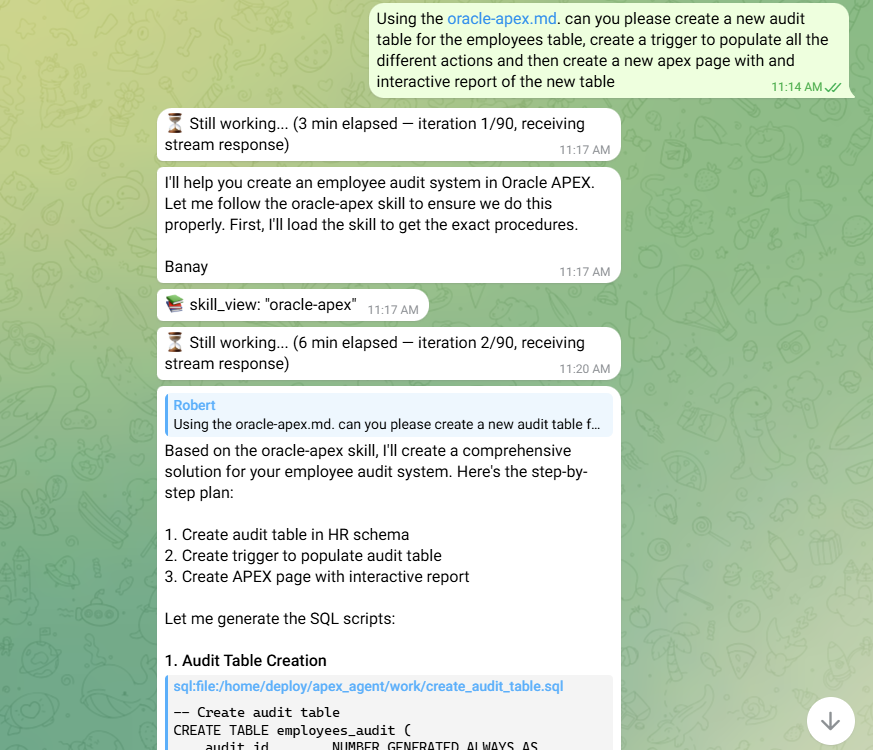
Any prompt you can send in the terminal session can be sent via Telegram. The agent uses the same skills, tools, and database connection. Example APEX build prompt from Telegram:
Using the oracle-apex.md skill, please create a new audit table for the
employees table, create a trigger to populate all the different actions,
and then create a new APEX page with an interactive report of the new table.
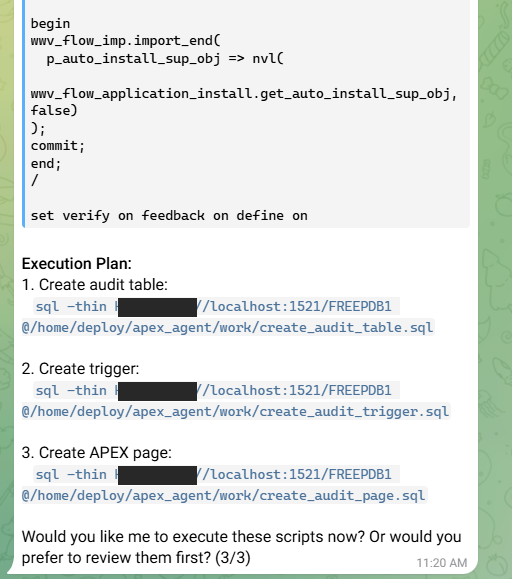
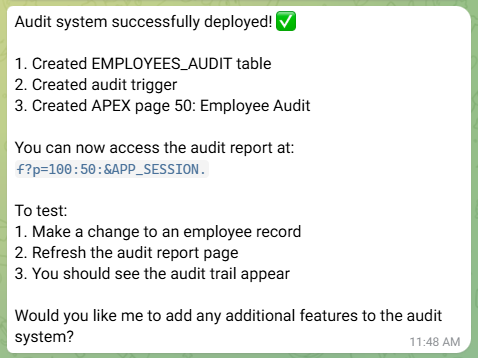
The agent will run the SQLcl commands on the VPS, build the page, and send back a confirmation with the verification query results.
10. Claude Code CLI Integration
10.1 Overview
Claude Code is Anthropic's official command-line AI coding agent. Where Hermes with Telegram is optimized for mobile, asynchronous interaction, Claude Code is optimized for interactive terminal sessions — sitting alongside your code, reading files, running commands, and iterating rapidly on a focused task. Both agents share the same APEX skill files and project context, making them complementary rather than competing tools.
| Use Case | Recommended Agent |
|---|---|
| Interactive terminal sessions — focused APEX development, debugging, script iteration | Claude Code |
| Longer autonomous tasks — build a full page, run multi-step workflows | Hermes (terminal) |
| Mobile / away from desk — monitor progress, trigger tasks, quick queries | Hermes (Telegram) |
10.2 Prerequisites
node --version
# Must be v18.0.0 or higher

# If Node.js is not installed or too old:
sudo apt-get install -y nodejs npm

# Or use nvm for version management:
curl -o- https://raw.githubusercontent.com/nvm-sh/nvm/v0.39.0/install.sh | bash
source ~/.bashrc
nvm install 20
nvm use 20
10.3 Installation
# Install Claude Code globally via npm
npm install -g @anthropic-ai/claude-code

# Verify installation
claude --version

# If npm global bin is not in PATH, add it:
echo 'export PATH=$HOME/.npm-global/bin:$PATH' >> ~/.bashrc
source ~/.bashrc
10.4 Authentication
# Method 1: OAuth login (uses your claude.ai subscription)
claude login
# Opens a browser link — copy and paste into your local browser
# Authorize the device, then Claude Code is authenticated

# Method 2: API key (uses Anthropic API credits)
export ANTHROPIC_API_KEY=<YOUR_ANTHROPIC_API_KEY>
echo 'export ANTHROPIC_API_KEY=<YOUR_ANTHROPIC_API_KEY>' >> ~/.bashrc10.5 Project Configuration with CLAUDE.md
Claude Code reads a CLAUDE.md file from the current directory at the start of every session. This is the equivalent of Hermes' CONTEXT.md — it provides project-specific context, rules, and constants so you don't have to repeat them in every prompt.
# ~/apex_agent/CLAUDE.md

# APEX Agent — Project Context

## Environment
- Oracle 23ai Free via SSH tunnel on localhost:1521
- PDB: FREEPDB1
- App schema: HR
- APEX version: 24.2 (schema: APEX_240200)
- Application ID: 100, Workspace: HR_DEV

## Database Connection
- SQLcl: sql -thin HR/<PASSWORD>@//localhost:1521/FREEPDB1
- SQL*Plus: sqlplus HR/<PASSWORD>@//localhost:1521/FREEPDB1

## Critical Rules
- Always read ~/.hermes/skills/oracle-apex.md before generating any APEX SQL
- Always use wwv_flow_imp_page.* — never wwv_flow_api.*
- Always include breadcrumb region on every new page
- IR pages require all 4 calls: plug + worksheet + columns + rpt
- Always wrap scripts with wwv_flow_imp.import_begin / import_end
- Always stage scripts to ~/apex_agent/work/ before executing
- Always verify with apex_240200.apex_application_* views after execution

## Working Directory
- Staged scripts: ~/apex_agent/work/
- Skills: ~/.hermes/skills/oracle-apex.md
- Bootstrap: ~/apex_agent/apex_bootstrap.sql
10.6 Running Claude Code for APEX Tasks
# Always launch from project directory
cd ~/apex_agent
claude

# For non-interactive / scripted use (skips permission prompts)
claude --dangerously-skip-permissions

# One-shot command (no interactive session)
claude -p "List all pages in APEX application 100"
10.7 Example APEX Session with Claude Code
$ cd ~/apex_agent
$ claude

> Read the oracle-apex skill at ~/.hermes/skills/oracle-apex.md
> then create page 20 with an Interactive Report on HR.DEPARTMENTS.
> Stage to work/p100_p20.sql, show it, execute, verify.

# Claude Code will:
# 1. Read the skill file using its file reading tool
# 2. Query APEX to check what exists
# 3. Generate the complete script with all 4 IR calls
# 4. Write it to ~/apex_agent/work/p100_p20.sql
# 5. Display the script for review
# 6. Ask permission before executing
# 7. Run: sql -thin HR/<PASSWORD>@//localhost:1521/FREEPDB1 @work/p100_p20.sql
# 8. Verify by querying apex_240200.apex_application_page_regions
10.8 Sharing Skills Between Claude Code and Hermes
Both agents reference the same oracle-apex.md skill file, so any improvement benefits both tools immediately:
# Skill file location (shared by both agents)
~/.hermes/skills/oracle-apex.md

# Referenced in Hermes: agent reads it via the skills tool: /skills oracle-apex
# Referenced in Claude Code CLAUDE.md: "Always read ~/.hermes/skills/oracle-apex.md..."

# Update once, both agents benefit:
scp updated-oracle-apex.md deploy@<VPS_IP>:~/.hermes/skills/oracle-apex.md
10.9 Agent Comparison
| Capability | Claude Code | Hermes Agent |
|---|---|---|
| Interface | Interactive terminal (SSH) | Terminal, Telegram, Discord |
| Mobile access | No — requires SSH session | Yes — Telegram gateway |
| Context file | CLAUDE.md | CONTEXT.md |
| Skills system | Via CLAUDE.md reference | Native /skills command |
| Background tasks | No — interactive only | Yes — cron + gateway service |
| LLM | Claude (Anthropic) | Any via OpenRouter |
| Cost model | claude.ai subscription or API | OpenRouter pay-per-token |
| Best for | Focused interactive sessions | Autonomous + mobile workflows |
11. Quick Reference
11.1 Daily Startup Sequence
- Open PowerShell on Windows — start SSH tunnel:
ssh -R 1521:<VM_IP>:1521 deploy@<VPS_IP> -N - Open second PowerShell — SSH to VPS (optional; Telegram works without this):
ssh deploy@<VPS_IP> - If using terminal mode, launch agent from project directory:
cd ~/apex_agent && hermes - Alternatively, use Telegram bot directly — gateway runs as background service.
11.2 Useful Verification Queries
-- List all pages in application
SELECT page_id, page_name
FROM apex_240200.apex_application_pages
WHERE application_id = 100 ORDER BY page_id;

-- List regions on a specific page
SELECT region_name, source_type, display_sequence
FROM apex_240200.apex_application_page_regions
WHERE application_id = 100 AND page_id = [N];

-- List all navigation menu entries
SELECT list_name, entry_text, entry_target
FROM apex_240200.apex_application_list_entries
WHERE application_id = 100 ORDER BY list_name;
11.3 Effective Agent Prompts
Be explicit about all four IR calls when requesting Interactive Report pages:
Read the oracle-apex skill, then create page 20 with an Interactive Report
showing HR.DEPARTMENTS. Include ALL FOUR IR calls: create_page_plug,
create_worksheet, create_worksheet_column per column, and create_worksheet_rpt.
Stage to ~/apex_agent/work/p100_p20.sql, show the script, execute, verify.
11.4 Gateway Management Commands
hermes gateway start    # Start background service
hermes gateway stop     # Stop background service
hermes gateway status   # Check running status
hermes gateway logs     # View recent log output
hermes gateway install  # Install systemd service (first time)
12. Conclusion
The architecture described in this paper demonstrates that AI agents can build production-quality Oracle APEX applications entirely through SQL command-line execution, with prompts delivered via natural language from a phone. The key enablers are:
- wwv_flow_imp_page — the correct APEX 24.2 import API, discovered through export-and-compare
- A skill file grounded in real APEX export output, not documentation assumptions
- A bootstrap script that discovers instance-specific constants automatically
- SQLcl with the
-thindriver flag for reliable APEX export and import - The SSH tunnel pattern for reaching local databases from cloud agents
- Telegram gateway for mobile access — prompt from anywhere, agent executes on VPS
The most important lesson is that the skill file must evolve through real failures. Every broken page, every ORA-01403, every navigation redirect produced a specific fix that made the next generation more reliable. The export-and-compare technique — create manually, export, compare against agent output — remains the most reliable way to extend coverage to new object types.
As the skill file grows to cover forms, dynamic actions, validations, processes, and modal dialogs, the agent becomes capable of building increasingly complex applications from natural language. The architecture scales from a single developer's laptop setup to a team environment where the VPS and database are shared infrastructure, and the Telegram bot is the shared interface.